
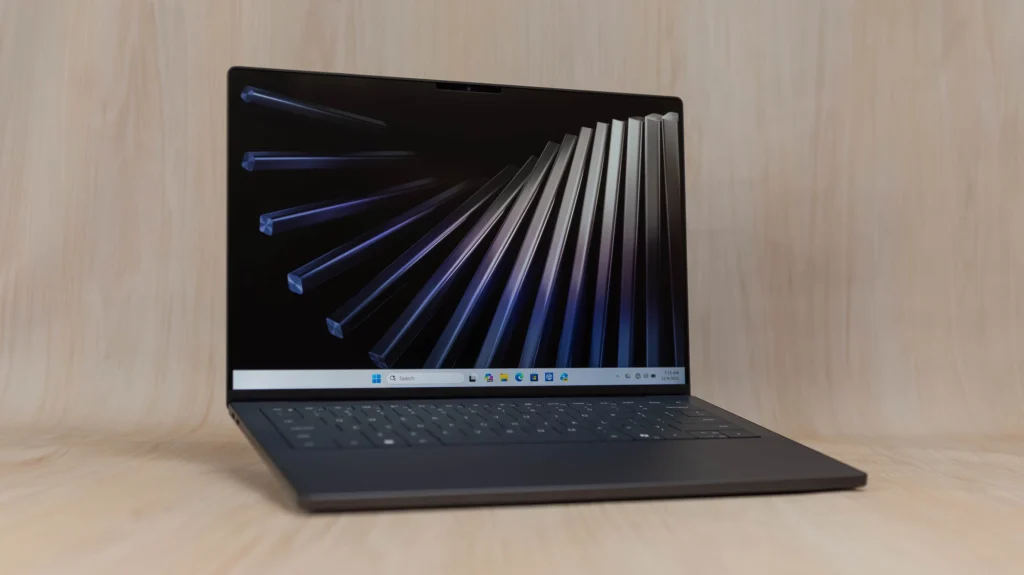

Dell’s XPS 14 is the kind of laptop that makes you stop and stare the first time you open it. It’s thin, sleek, and premium, but it doesn’t feel fragile. Instead, it promises strong performance, a gorgeous display, and all‑day battery life—wrapped in a compact 14‑inch body that’s easy to carry around. For creators, professionals, and power users who want a no‑compromise Windows machine, the 2026 XPS 14 is a very tempting option, especially since Dell has now positioned it as an AI‑ready Copilot+ PC.
What the XPS 14 Is All About
The XPS 14 sits between the smaller XPS 13 and the larger XPS 16, giving you a bit more screen and power without turning into a bulky machine. It runs on Intel’s latest Core Ultra chips, which include a Neural Processing Unit (NPU) for running AI tasks like Microsoft Copilot directly on the device. This makes it more than just a pretty laptop; it’s built to handle modern AI‑assisted workflows in photo editing, coding, and content creation.
In simple terms, the XPS 14 is a high‑end ultrabook that’s tuned for creative work and heavy multitasking. It’s the kind of laptop you’d pick if you want a Windows alternative to a MacBook Pro but in a lighter, more compact form.
Design and Build: Premium Feel, Travel‑Friendly Size
One of the first things you’ll notice about the XPS 14 is how clean and minimalist it looks. Dell sticks to its signature design language here: an aluminum chassis, slim bezels around the screen, and just a subtle XPS logo on the lid. The laptop feels solid in your hands, with no creaking or flex, and the weight hovers around 1.6–1.7 kg, which is light enough for daily commutes but still reassuringly premium.
On the inside, the keyboard deck is smooth and refined, with a large glass touchpad that tracks fingers accurately and supports multi‑touch gestures. The keyboard itself is comfortable enough for long typing sessions, with good key travel and a quiet typing sound. Dell also brings back physical function keys, so you’re not stuck with a touch‑based strip that often feels more gimmicky than useful.
Display: Rich, Colorful, and Creator‑Ready
The XPS 14 gives you two main screen options: a high‑refresh IPS panel and a higher‑end OLED. The 1920×1200 FHD-plus IPS screen is bright, smooth, and more than good enough for everyday work, browsing, and video calling. If you care more about color and contrast, the 3200×2000 OLED model is the way to go. It offers deeper blacks, punchy colors, and a 120 Hz refresh rate, making it excellent for photo and video editing or just watching high‑quality movies.
Whichever panel you pick, the screen is sharp and easy on the eyes, with good viewing angles and minimal color shift when you look at it from the side. That makes the XPS 14 a great choice for anyone who spends hours staring at the display, whether you’re editing images, coding, or just watching your favorite shows.
Performance: Power Where You Need It
Under the hood, the XPS 14 is powered by Intel’s Core Ultra 5 or Ultra 7 processors, depending on the configuration. Higher‑end models can go up to the Core Ultra 7 155H or even 355, with up to 32 GB of fast LPDDR5x RAM and 1–2 TB of SSD storage. This combination means the laptop can handle heavy multitasking, large files, and demanding creative apps without breaking a sweat.
In real‑world use, you can expect smooth performance in Photoshop, Lightroom, Premiere Pro, and similar tools. The XPS 14 is also capable of light‑to‑moderate gaming, especially if you opt for a configuration with an NVIDIA RTX 4050 GPU. For AI‑powered features, the NPU helps offload tasks like Copilot, voice assistants, and background optimizations, keeping the main CPU and GPU free for more intensive work.
Battery Life and Cooling: Long Rides Without Overheating
One of the XPS 14’s standout features is its battery life. Reviews and real‑world tests show around 10–12 hours of mixed use on the IPS model, with slightly less on the OLED variant. That’s impressive for a high‑performance ultrabook, and it means you can work through a full day without constantly hunting for a charger. Some marketing claims even mention up to 30+ hours of battery under ideal conditions, though real‑world use will be closer to the 10‑hour range.
Dell has also tuned the cooling system to keep temperatures in check. The laptop can sustain bursts of CPU and GPU load without getting too hot or noisy. Under normal workloads, it stays quiet and cool, making it comfortable to use on your lap or a small desk. It’s not a gaming‑laptop‑level cooler, but it’s more than adequate for the kind of work this machine is meant for.
Audio, Ports, and Everyday Use
The XPS 14 doesn’t skimp on audio either. Many configurations come with quad speakers, which deliver a richer and more balanced sound than most slim Windows laptops. This makes it great for watching movies, listening to music, or taking video calls without needing external speakers all the time.
On the port side, you get a mix of USB‑C and Thunderbolt‑style ports for fast data transfer, charging, and external displays. Some models also include HDMI or similar video outputs, Wi‑Fi 7, and Bluetooth, future‑proving your setup for fast networks and peripherals. This means you can easily connect external monitors, fast storage, and docking stations, while still keeping the laptop slim enough for travel.
Who Should Buy the XPS 14?
The XPS 14 is ideal for:
- Creatives: Photo and video editors, designers, and content creators who want a compact powerhouse with a top‑notch screen.
- Professionals: Business users and developers who value a premium build, clean Windows experience, and AI‑ready features.
- Everyday Users: Anyone who wants a lightweight, high‑end laptop that can handle everything from work to streaming.
The price is premium, so it’s worth it if you care about the combination of screen, build, and AI‑ready performance. If you’re looking for a MacBook Pro alternative or a Windows machine that’s both powerful and portable, the Dell XPS 14 is a strong contender.


